
Hero Health changelog
Inbox: Multi-task episodes & inline messaging
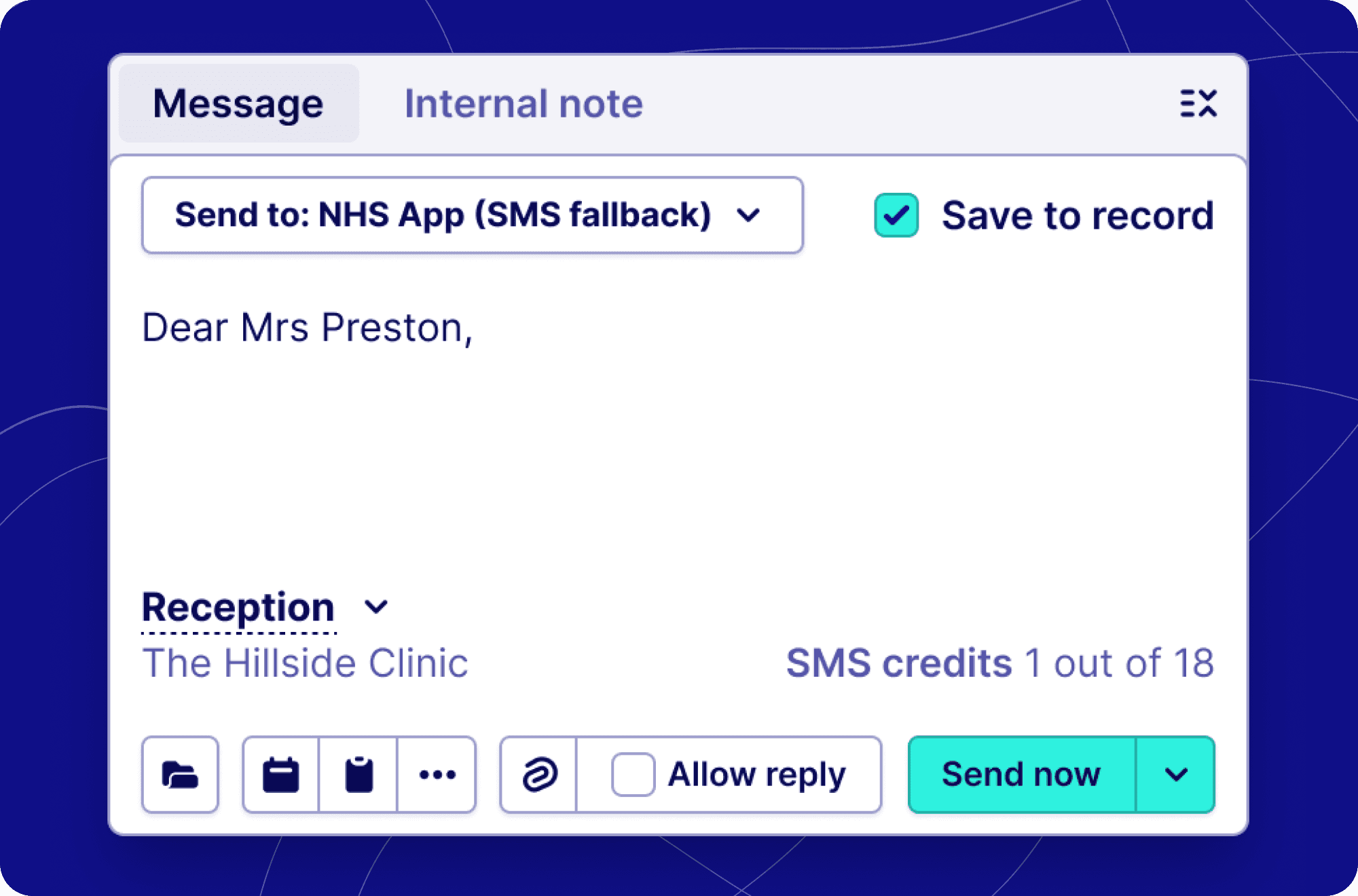
A faster, more connected way to manage patient conversations.
What's new for inbox users
💬 Message without leaving the episode
Sending a patient a message used to take you away from the inbox entirely — now it doesn't. The message composer is built directly into the bottom of the episode panel, so you can write and send messages while keeping the full patient conversation in view above you.
What's different day-to-day:
No more navigating away to a separate page to send a message
You can read the patient's history and compose your reply at the same time
Everything you're used to is still there — templates, attachments, and contact method selection — just in one place
Messages you send appear immediately in the episode timeline, keeping the full picture in one view
🧠 Behind the scenes: smarter task handling
You may not see this directly, but a number of improvements have been made to how the inbox handles work created by messages. When you send a patient a message containing a booking link, a form, or a reply prompt, the inbox now creates and tracks each of those as separate items — meaning nothing gets lost, and the right task lands in the right inbox view at the right time.
If a patient books an appointment, cancels, reschedules, or submits a form in response to your message, the episode will automatically re-surface in the inbox so it doesn't fall through the cracks.
📁 Everything is now captured in the episode timeline
Every interaction with a patient — messages sent, forms completed, appointments booked or cancelled — is now recorded directly in the episode. You get a full, chronological picture of what's happened without having to piece it together from different places.
🔄 How sending a message now works
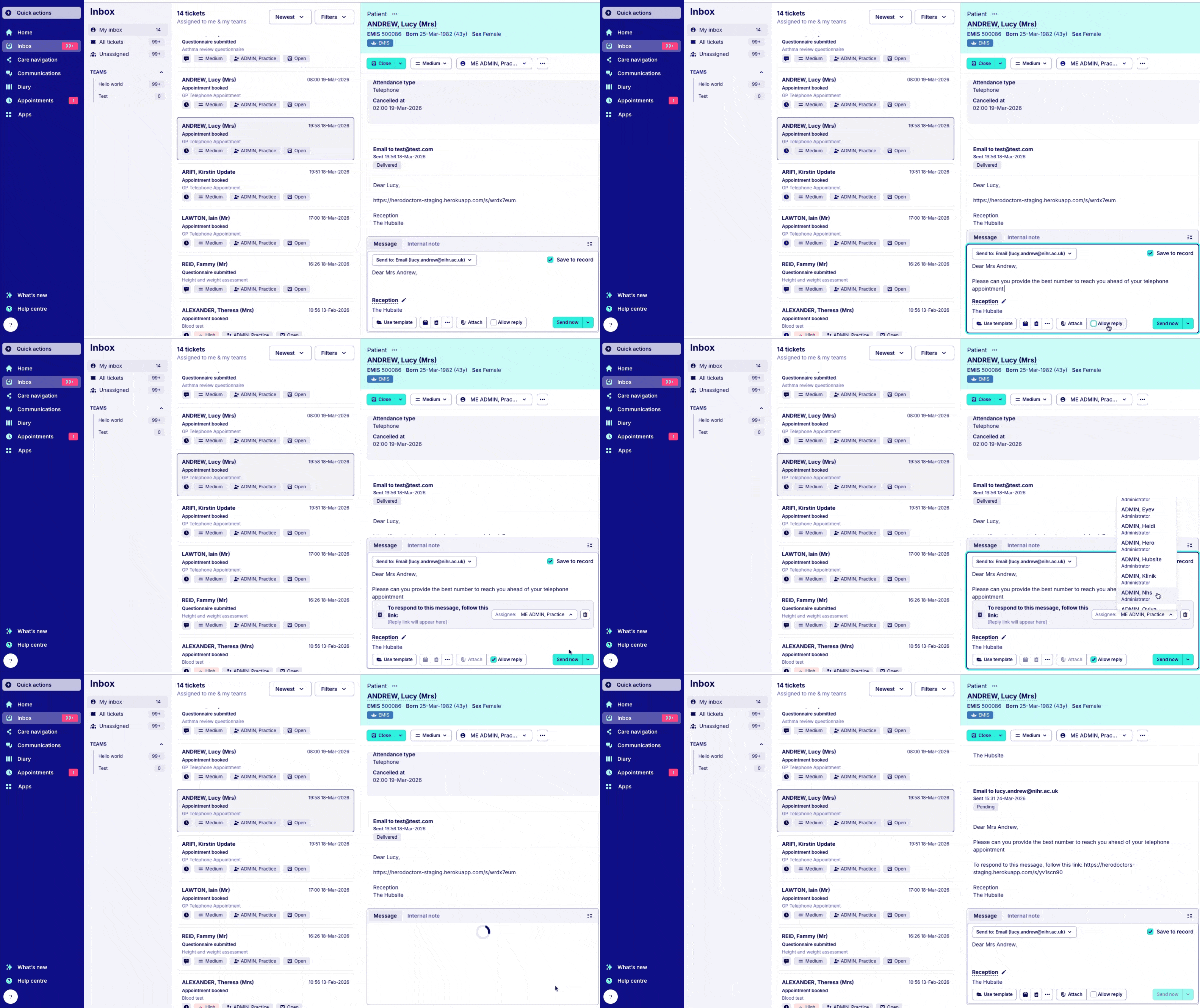
Here's the updated flow from start to finish:
Open an episode in the inbox
The message composer is already there at the bottom of the panel — no button needed to navigate away
Write your message — apply a template, invite the patient to book, or attach a file as needed
Send — you stay in the episode, and the sent message appears in the timeline above
That's it. The previous workflow, where clicking 'Send' would load a full-page builder and remove the inbox from view entirely, is gone.
What's new for individual messaging users
📋 A single, simpler message builder
The tools for building a message have been consolidated into one compact input box. Whether you're sending from within an episode or elsewhere in the inbox, the experience now looks and works the same way.
Clearer link placement: Now when adding a link, we show a box that has an assignee option and a clearer way to remove the link from the message
Preset link text: When adding a link we have preset text to prompt the patient to access the link. Saving you time typing the same label against a link.
Availability window: We’ve added the ability to specify availability windows to your patient booking invitations. When creating a booking link, you can select a date range for the slot(s). This allows you to protect immediate appointment availability and empower patients to book further into the future or only provide slots for the current week. This update gives you more control over how you deliver online booking.
Preview questionnaires: You can now preview the form before sending it to the patient. Simply select the questionnaire link option via the message builder, choose your questionnaire, and you will be shown a preview of the questions before creating the link.
This means less clicking, less switching between views, and a more consistent experience across the board between the inbox and individual messaging.
✅ What hasn't changed
The following are exactly the same as before:
All your existing message templates and content
Contact method options (SMS, email, and NHS App for NHS practices)
Booking and questionnaire links, Attachment support and patient replies
Permissions and access controls
Find out more about how the inbox works here.
For API users
API changes (v2)
Episodes now return real persisted tasks instead of synthetic tasks, and the inbox task payload has been enriched with new fields:
{
  "tasks": [ /* real persisted tasks, not synthetic */ ],
  "inbox_task": {
    "name": "...",
    "assignee": { ... },
    "triggered_by": { ... }
  }
}
New task type: MessageCreated — message-originated actions are now a dedicated, queryable task type.
Link-specific episode behaviour:
Auto re-open episode? | Assignee behaviour | |
|---|---|---|
📋 Form / questionnaire | ✅ Yes (where applicable) | Applies form-flow assignee update |
📅 Booking | ✅ Yes (where applicable) | Applies booking-flow assignee update |
Summary of API-level changes:
Area | Change |
|---|---|
Episode tasks | Migrated from synthetic → real persisted tasks |
Task types | New |
Episode behaviour | Link-type-specific auto re-open + assignee logic |
Admin app | Enriched task payload with |
Public API (v2) | Same enrichment, real tasks returned |