
Reminder mailers
Hero Health provides an automated appointment reminder system, helping to reduce no-shows and improve the overall patient experience.
With Hero Health, you can enable automatic appointment reminder emails for patients. Once activated, reminders are seamlessly delivered without manual intervention, ensuring patients are informed about their upcoming appointments, and can cancel or reschedule if necessary.
Enable appointment reminders
Step 1: Identify appropriate slot types
Before enabling appointment reminders we recommend creating a list of slot-types; including if they are delivered face-to-face, by telephone, or by video or if they admin slots (we also advise including the DNA rate for each type).
Once you have a list of all you slot types you will be able to see which slot-types need appointment reminders turned on.
Step 2: Open Hero and find slot types
You can now sign in to Hero and navigate to your slot-type (Settings > Appointment > Appointment types). From the list of slot types you can find the ones you want to enable reminders for and click Options -> Edit this will open the slot-type settings.
Step 3: Pick the slot type attendance type
Once you have opened the slot-type settings you can navigate to the General tab and find section called Attendance.
Here you can select how the appointment will be delivery, this will be used when the appointment reminder content is dynamically generated.
Step 4: Select the delivery channel
After having selected the attendance type you can how the appointment reminder will be sent to the patient. Remaining on the General tab you can go to the Appointment reminder section and selected the channel.
For NHS practices:
Here you can select to send the reminder using:
Smart sequencing - Hero first attempts to send the reminder through the NHS App if the patient does have the NHS App we'll automatically reattempt via email
SMS - we'll always send reminders for this appointment type to the patient's mobile on record
For private practice:
Here you can select to send the reminder using:
Email - reminder will be sent to the patient's email address on record
SMS - reminders will be sent to the patient's mobile number on record
Step 5: Save preferences
Once you have selected the attendance method and the delivery channel you can simply click Save and this will automatically enable reminders for this slot type.
How appointment reminders work through the NHS App
Through our integration with the NHS you can enable reminders to be sent to patient via NHS. When a message is sent to the NHS App, Hero will be able to see if the patient's device has successfully received the notification.
What if the patient does have the NHS App?
In the event the patient has not installed the NHS App on their device, Hero will automatically reattempt to send the reminder to the patient's email address.
Improved delivery rate with email fallback
To improve the delivery rate of our appointment reminder we have implemented a new Smart Sequencing feature. Smart Sequencing will automatically detect that the patient has not received a notification to their device and will reattempt the message to the patient's email address.
Using SMS appointment reminders
SMS reminders are very similar to reminders sent via the NHS App. The patient will receive an SMS informing them of their upcoming appointment with a link to view, cancel or reschedule their appointment.
Unfortunately, SMS reminders do incur a small fee based on the number of credits used to send the SMS. The credits will be taken from the SMS count connected to your account.
Reminders cadence
Appointment reminders are configured to be automatically sent to patients 24 hours before their appointment is due to start.
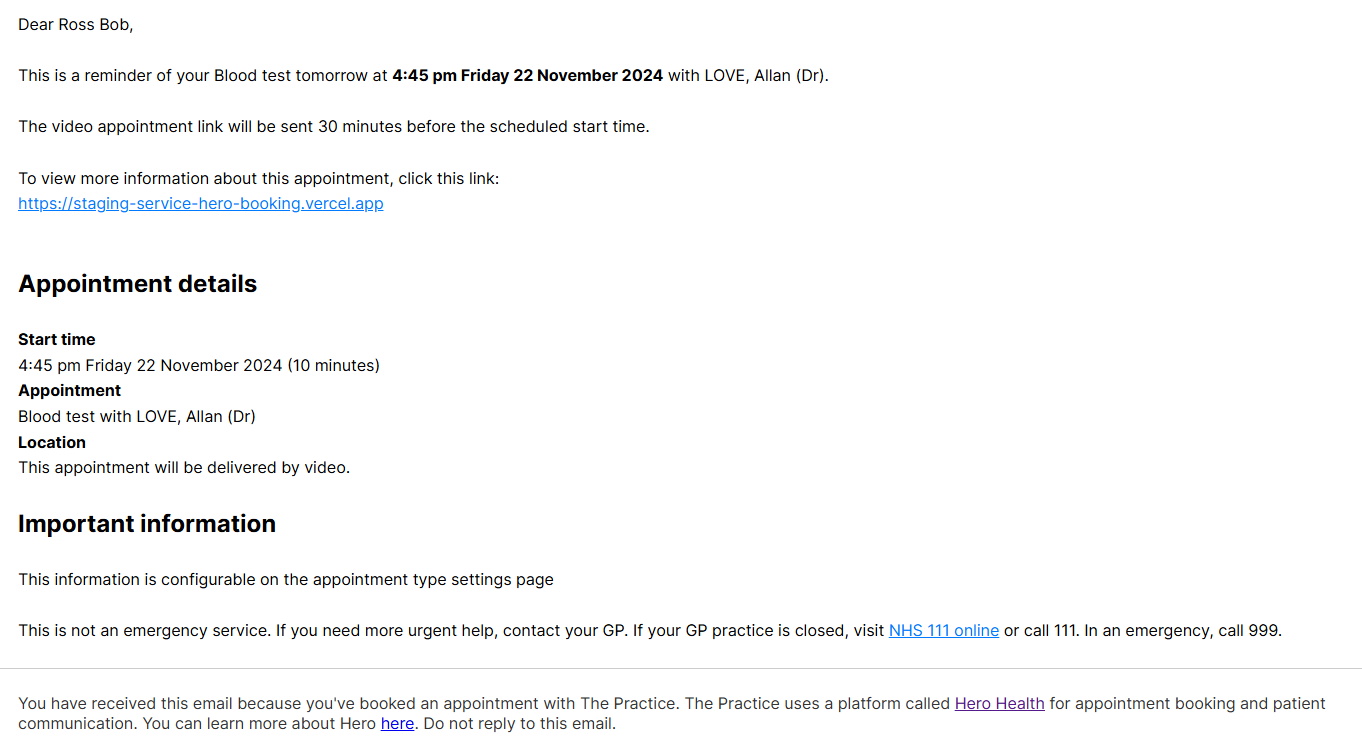
If an appointment is configured within the Hero settings to be delivered by 'video', the patient will be sent another reminder 30 minutes before the appointment is due to start. This email will contain a link for the patient to join the video consultation.
Reminder email content
Hero Health’s appointment reminders are dynamic and tailored to the specific details of the appointment. The content of the reminder will adapt based on the following:
Whether the appointment is set to be delivered face-to-face or by video
Whether the appointment can be cancelled or rescheduled
Whether the appointment type has a confirmation message. This can be configured in the settings
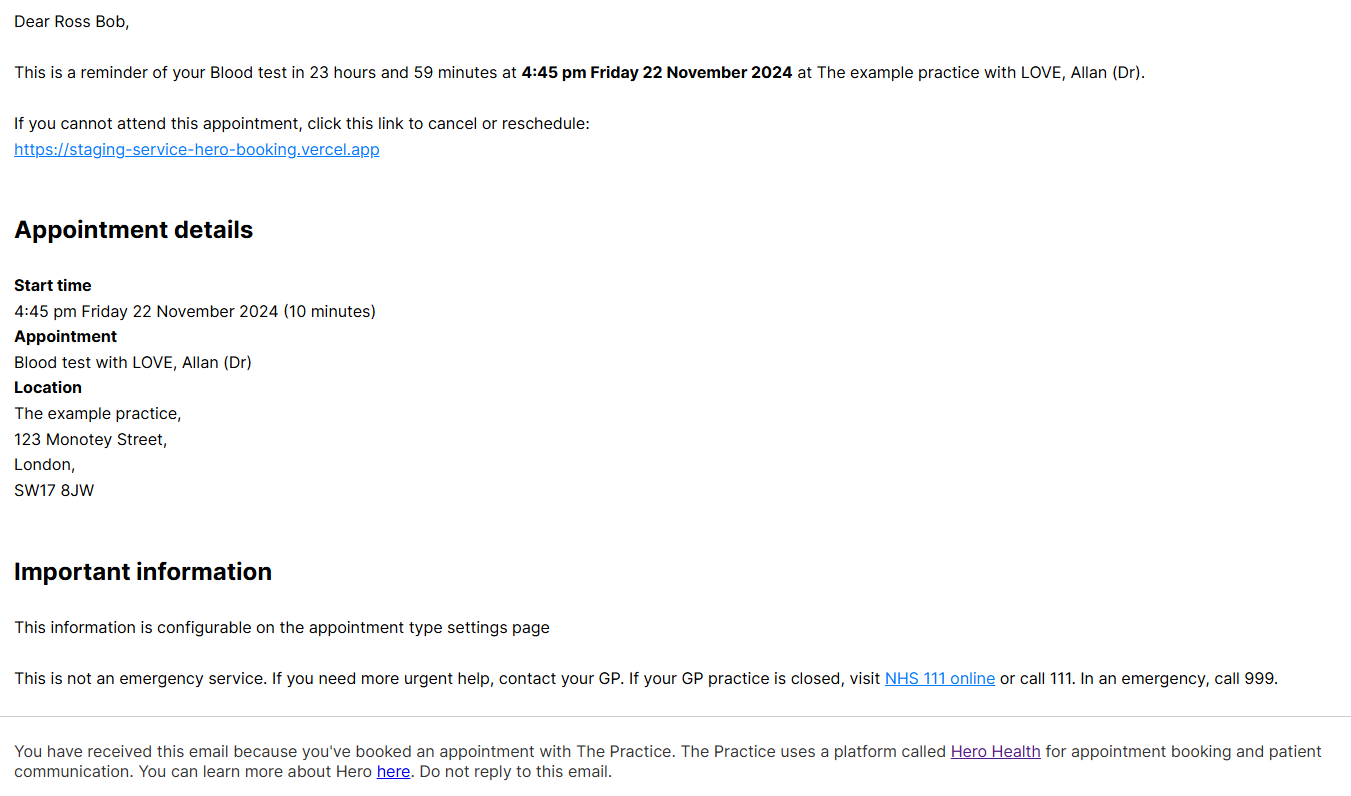
Below are two examples of emails sent to patient reminding them of their appointment.
Example reminder - Face to face appointment that the patient can cancel or reschedule
Example reminder - Video appointment that can not cancelled or rescheduled
Benefits of using Hero Health appointment reminders
By automating reminders with Hero Health, your practice can save time, enhance communication, and reduce appointment DNA rates.
Was this helpful?