
Contact methods
When sending a message to a patient, you'll be prompted to choose a contact method, the channel through which the message will be delivered.
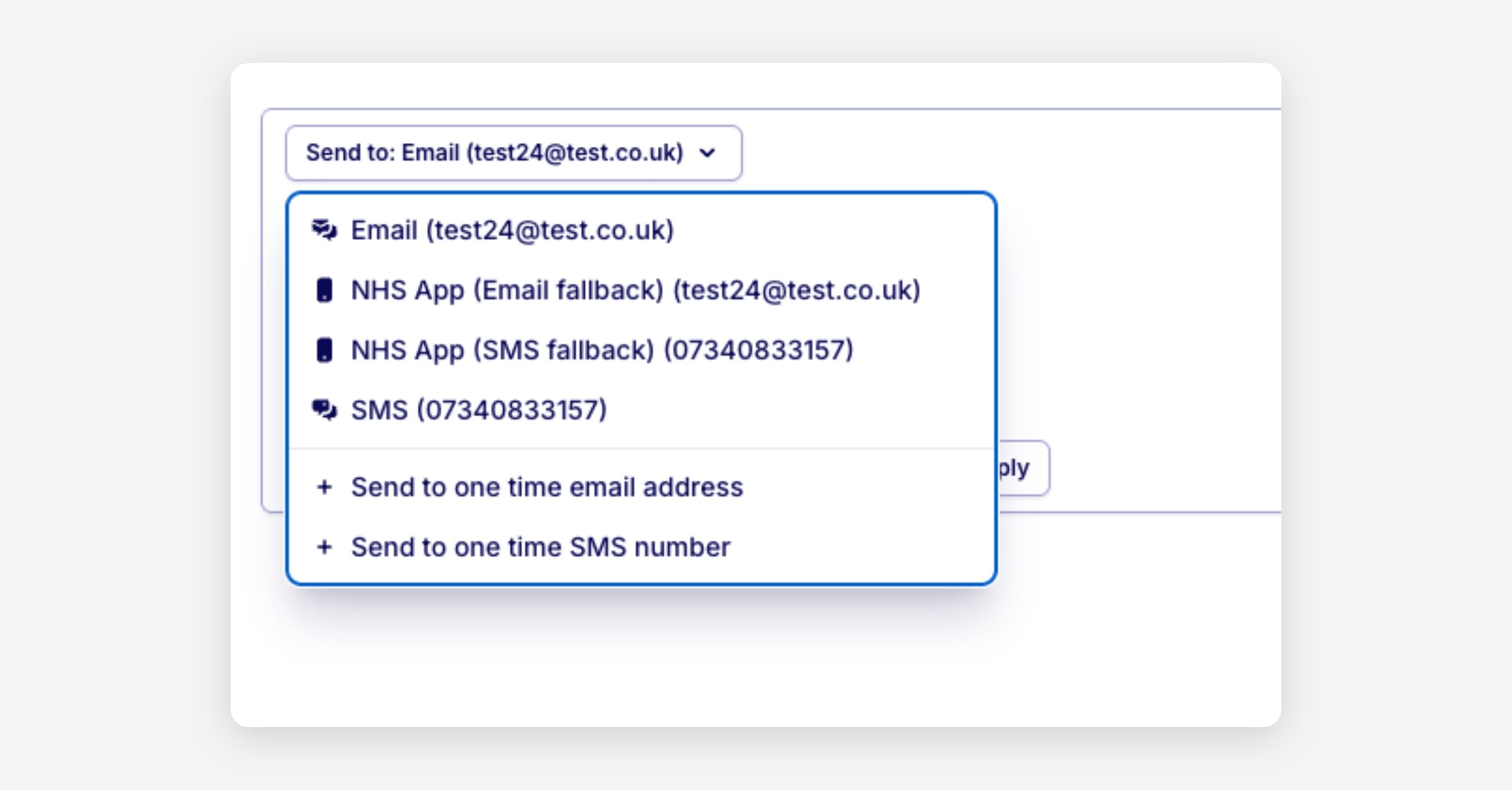
Available contact methods
Hero supports up to four delivery channels, depending on your practice's configured capabilities and the patient's details on record.
Messages are sent to the patient's email address via Hero's email provider (AWS SES). If an email address is stored on the patient's record, it will be pre-filled in the "To:" field automatically.
SMS
Messages are sent as a text message using your practice's configured SMS provider (e.g. Firetext). If a mobile number is stored on the patient's record, it will be pre-filled automatically.
NHS App: Send to email if unread*
Messages are delivered as an NHS App notification first. If the patient does not read the notification within a set period, it automatically falls back and is sent to their email address.
This option is only available when the patient has an NHS number and your practice has the NHS Notify integration enabled.
NHS App: Send to SMS if unread*
Works the same as the email fallback variant above, but falls back to an SMS message instead of email if the notification goes unread.
This option additionally requires your practice to have SMS messaging enabled via FireText.
*Only available to NHS primary care providers
One-time contact details
For Email and SMS channels, if no contact detail is saved on the patient's EHR record, the "To:" field will be left blank with a placeholder prompt:
"Send to one time email address"
"Send to one time phone number"
This allows you to manually enter a contact detail for that specific send only. The address or number you enter is not saved to the patient's record, it is used for that message alone.
Why this matters
There are several common situations where a one-time contact detail is needed:
No contact on record: The patient hasn't provided an email address or mobile number, but you have a way to reach them for this message.
Outdated details: The contact saved in the system is known to be incorrect or has changed, and you have a verified alternative for this instance.
Third-party or representative contact: You need to send a message to a carer, guardian, or representative rather than directly to the patient.
Temporary or alternative address: The patient has requested correspondence goes to a different address on a one-off basis.
If the patient doesn’t have an email address, SMS or NHS number the contact method won’t be an option in the dropdown, so you can quickly identify when a one-time entry will be required before selecting that channel.
Comparing delivery channels: Which is best for your practice
Delivery channel | Successful delivery * | Cost |
NHS App | 96% ** | FREE |
96% | FREE | |
SMS | 88% | 2p-4p per reminder *** |
* Delivery rate has been calculated based on all messages sent through Hero in a month period
** NHS App delivery rate includes reattempts through Smart Sequencing
*** The cost per SMS reminder is dependent on the length of the dynamically generated content of the message - typically ranges between 1 and 2 SMS fragments
How messaging fallback works in Hero
Hero’s notification service attempts to deliver messages through the NHS App first. If the message is not received or seen by the patient within 1 hour, a fallback message is triggered to a secondary channel - email or SMS, depending on the configuration and availability of patient contact details. How the Fallback Works
Primary Channel: NHS App
Hero sends the message to the NHS App. After 1 hour, the system checks whether the patient has received and seen the notification (i.e. opened it on their phone). If the notification has not been opened, a fallback is triggered.
Fallback Channels
If the NHS App message is not seen, Hero will fall back to either: Email (default for most setups) SMS, if preferred and configured The fallback channel used depends on practice configuration preferences.
Was this helpful?